Getting started
Start a conversation, then check the answer before using it.
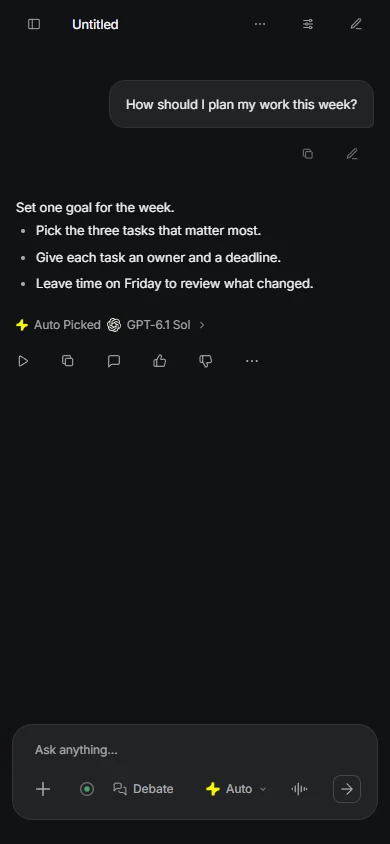
- Open Chat and sign in for your account's models and tools.
- Describe your task and add relevant context.
- Read the answer, inspect source links and ask a follow-up.
Chat & Auto
Auto chooses the model and effort; you can choose a model yourself.
- Send your question and check the model label on its answer.
- Open the model control, search by model or maker, and check the plan label. You can also type an @mention.
- Continue the conversation for follow-ups; start a new one for an unrelated task.
Ask a side question
Start a message with @btw for a quick detour. Its answer stays visible but is left out of later main-conversation context. Debate and deep research treat @btw as ordinary text.
Attachment limits
Up to 4 files: JPEG, PNG, GIF, WebP and PDF. Device images: 50 MB before preparation, 10 MB each after preparation. PDFs: 20 MB each. Combined prepared uploads: 20 MB. Model image support varies; audio-file upload is unsupported.
Research & Debate
Inspect sources for current facts and use Debate for a second review.
- Ask for current information; open any source links and check dates and claims.
- Choose Debate when another model's critique would help.
- Review the final synthesis; extra review does not guarantee correctness.
Access & limits
Signed-in accounts have capped built-in tools. Air includes two Debates per week; Pro and Max have no weekly attempt cap, subject to allowance. Deep research requires paid access and provider availability.
Tools & connectors
Connect an available service and approve actions that change it.

Connect a service
- Open Customize → Tools & connectors in Chat.
- Choose an available service and authorize access when asked.
- Ask for your task; review and approve writes in the conversation.
Canvas & scheduled tasks
Keep work beside Chat and download anything you want to keep.
- On desktop, open Canvas and side chat in the header. On phones, find it in Chat actions, then choose Canvas or Side chat.
- Edit, preview or run sandboxed JavaScript in Canvas.
- Download work before closing the window.
Storage & availability
Canvas tabs are held in this window, not durably saved to the cloud; JavaScript has no network and Python is unsupported. Side chats cannot run local Projects tools. Paid deep research and image creation depend on account and provider availability.
Scheduled hosted prompts remain internal Projects features. They cannot use local files; failures appear in-app, without email or push alerts.
Editor & local Projects
Desktop app and Kakon for VS Code: Coming 1 December 2026. Neither is available before launch; Chat is available now.

- After the 1 December 2026 release, install the extension in VS Code ≥ 1.95 and open one local folder.
- Run Kakon: Sign in, then Connect editor and Return to editor in the browser.
- Open the panel, choose Ask or Build and send your task; approve changes, then inspect Open diff and Accept or Reject each edit.

Choose an agent mode
- Ask: read and answer without edits.
- Plan: propose a read-only approach.
- Build: edit files and run commands after approval.
- Auto: permitted edits and commands within guardrails; Git branch, commit, push and pull-request actions still ask.
Local access & recovery
Untrusted folders allow Ask only. No desktop companion is needed for the editor. Remote, virtual and multi-root workspaces are outside scope. Review when idle; Reject and rewind protect later disk edits. Command and Git effects need separate recovery.
Team Pool


Share a Max allowance across up to five total seats while keeping each member's chats private.
- Open Team Pool as the Max owner.
- Invite members and set individual spending limits and permissions.
- Review shared usage in the app.
Plans & billing
Check your plan, purchase period and allowance before paying.
- Compare Free, Air, Pro and Max and select your purchase period and currency.
- Read the checkout terms; renewal is manual.
- Check usage and balance in your account; use the app's top-up flow for extra credit.
Purchase periods & credit
Monthly covers 4 weeks; yearly covers 13 cycles (364 days). Credit arrives per cycle, with four weekly releases; a new cycle replaces old cycle credit. Early renewal extends the term without replacing current credit. Cancellation preserves the current cycle and stops future yearly grants.
Privacy & help
Review what you share and check account access when a feature is missing.
- Check selected context before sending it; secret masking does not detect every secret.
- Read the Privacy Policy for storage, recipients, export and deletion.
- Check connector availability or Projects access, then contact support with the steps where you got stuck.
Editor tools run locally, but selected context and tool output go to Kakon and the answering model provider.